Doctors were managing patient nutrition with printed charts and spreadsheets. I replaced that manual chaos with a structured, insight-driven platform — and built the brand from scratch.
When I joined Selfcare, their team of doctors was manually managing patient health and food intake using document folders, printed charts, and scattered spreadsheets. It wasn't just old-school — it was actively holding them back.
Data was fragmented, insights were missed, and scalability was impossible. My goal was to design a system that worked the way doctors think: simple, structured, and instantly insightful.
This meant not only designing a clean, functional dashboard, but also building a full brand identity and scalable design system from scratch — giving the platform a professional foundation ready for growth.
Led the full UX design from architecture to high-fidelity mockups, focusing on clarity, speed, and zero-friction daily use by practicing doctors.
Conducted 1-on-1 interviews with Selfcare's doctors and shadowed their daily intake and reporting workflows to uncover real friction points.
Built Selfcare's brand from zero — logo, palette, typography — and delivered a full component library and style guide for developer handoff.
Mapped every workflow from offline chaos to digital clarity, translating folder-based habits into a coherent, scalable product architecture.
I spent the first week deep in their world — observing, listening, and cataloguing every friction point before writing a single design rationale.
Research Process
Shadowed daily workflows and folder-sorting rituals to see exactly where time was being lost.
Reviewed Excel trackers and patient health notes — mapping where data lived and where it fell through the cracks.
Conducted 1-on-1 interviews with 3 doctors to surface hidden pain points and wishlist features.
Audited existing tools to understand why doctors had rejected them — and designed specifically around those reasons.
Top insight: a simple dashboard with logs, summaries, and trends would save hours per week — if it felt as fast to use as opening a folder.
Research & workflow mapping phase
Top Insights
Patient journey mapping
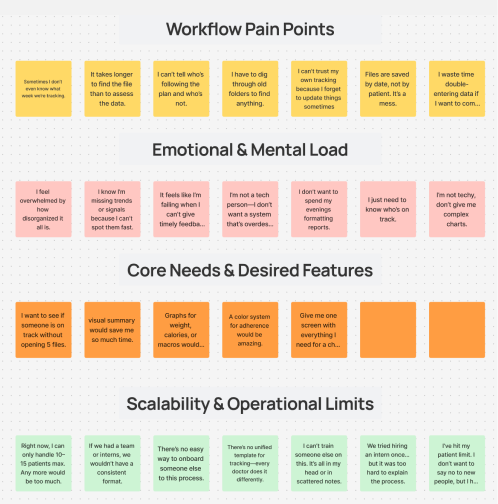
After interviews and workflow shadowing, I mapped every insight onto a pain-point board — grouping quotes by theme to find the patterns that would drive design decisions.
Doctors couldn't find files quickly, didn't know who was following a plan, and were double-entering data constantly. These friction points directly shaped the dashboard's single-screen information architecture.
"Give me one screen with everything I need" and "a visual summary would save me so much time" — these two quotes became the north star for the dashboard layout and the stat card row.
"I feel overwhelmed" and "I'm not a tech person — don't give me complex charts" told us simplicity wasn't optional. Every screen had to pass a gut-check: would a non-technical doctor feel calm or stressed opening this?
"I can only handle 10–15 patients max" wasn't a personal limit — it was a system limit. This drove the decision to build structured onboarding flows and a patient directory, so the platform could scale beyond one doctor's memory.
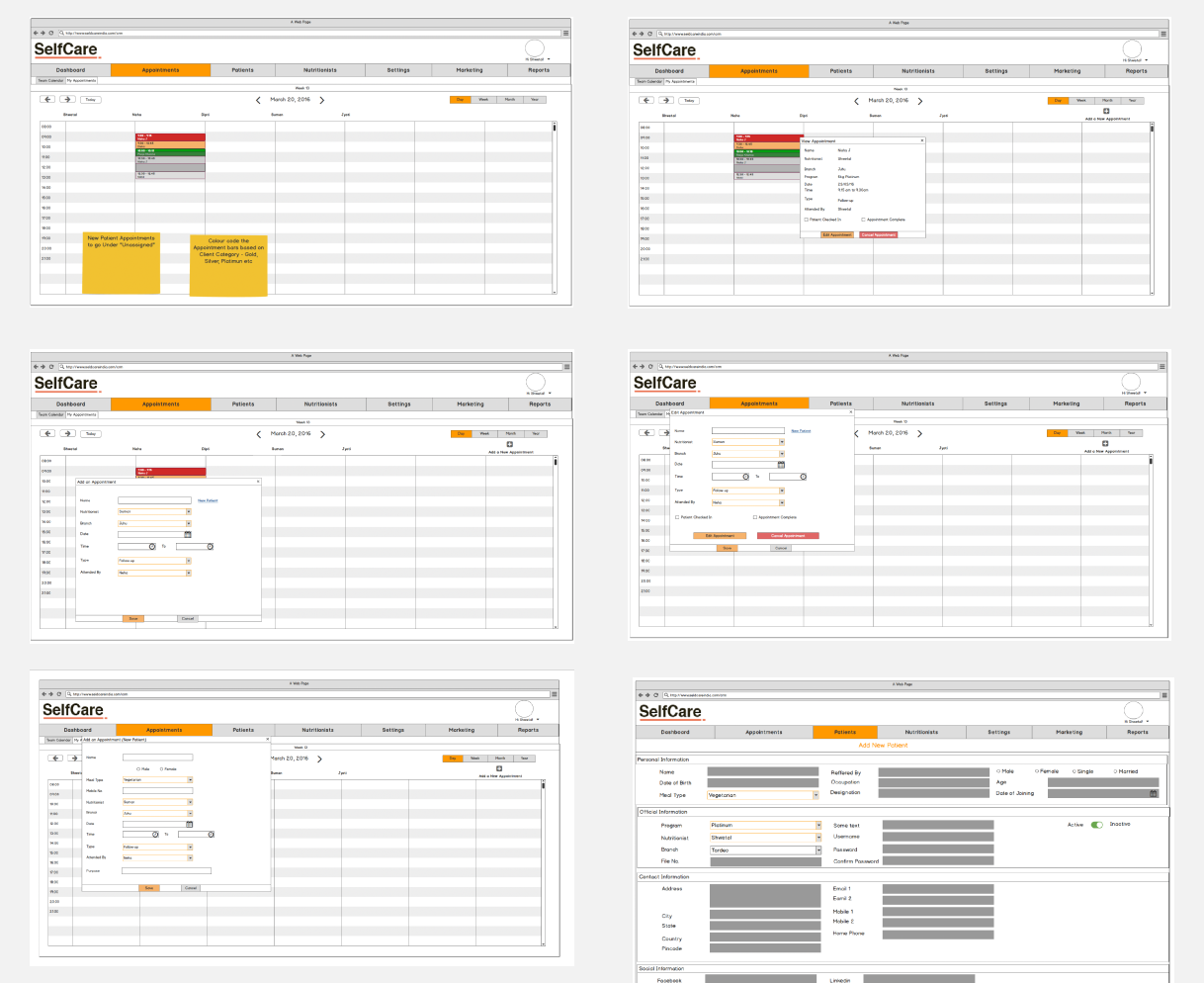
Before any visual design, I wireframed the core flows — appointments, patient intake, and the add-patient form — keeping everything close to how doctors already worked so the learning curve stayed near zero.
New patient appointments needed to be visually distinct. The wireframe established colour-coding by client category (Gold, Silver, Platinum) — mirroring a system doctors already used mentally, now made visible.
Clicking an appointment slides open a detail panel without leaving the calendar — a deliberate choice to avoid page navigation that interrupts a doctor's flow mid-consultation.
The form was intentionally kept to the minimum viable fields — name, branch, date, time, type, attended by. Anything extra was removed after testing showed doctors would abandon a long form mid-way.
Edit and Cancel actions were separated visually and given equal weight — based on feedback that doctors frequently needed to reschedule, not just cancel, and the old system made rescheduling feel irreversible.
The add-patient form captured personal, clinical, and contact info in one structured flow — replacing the scattered entry across 3–4 different Excel sheets doctors were previously maintaining per patient.
The final UI brought together every research insight and wireframe decision into a single, cohesive product. Here's what each part of the screen is doing and why.
The primary brand colour anchors every screen. Orange was chosen specifically because it reads as active and clinical — not cold like blue, not as informal as green. It tells doctors "this is a tool, not a website."
Active Patients, New Patients, Collections, Outstanding, Missed Appointments — the five numbers a doctor needs before they open a single file. Each has its own icon and colour so they're scannable in under 2 seconds.
Month is the default view — not day or week — because doctors plan in monthly rhythms. Colour-coded appointment pills let them spot busy weeks and patient categories without clicking into any individual entry.
The to-do panel replaced a physical notepad doctors kept beside their screen. Overdue tasks turn red automatically — a direct response to the research insight that doctors "didn't know who was following the plan."
Every program change, consult update, and patient modification is logged with a timestamp. This addressed a critical pain point: "I can't trust my own tracking because I forget to update things." The system now tracks it automatically.
The patient profile consolidates personal info, medical history, program details, visit history, and weight goals onto one tabbed screen. Before this, a doctor needed 4–5 open files to get the same picture.
Selfcare had no existing brand. I designed a complete colour system from scratch — every token mapped to a purpose, every shade earning its place in the UI.
Nav #1E293B · Active item #F97316
"Selfcare went from a team buried in paper to a practice with a professional, scalable platform — designed for the real-world demands of nutrition-based healthcare."